Basics
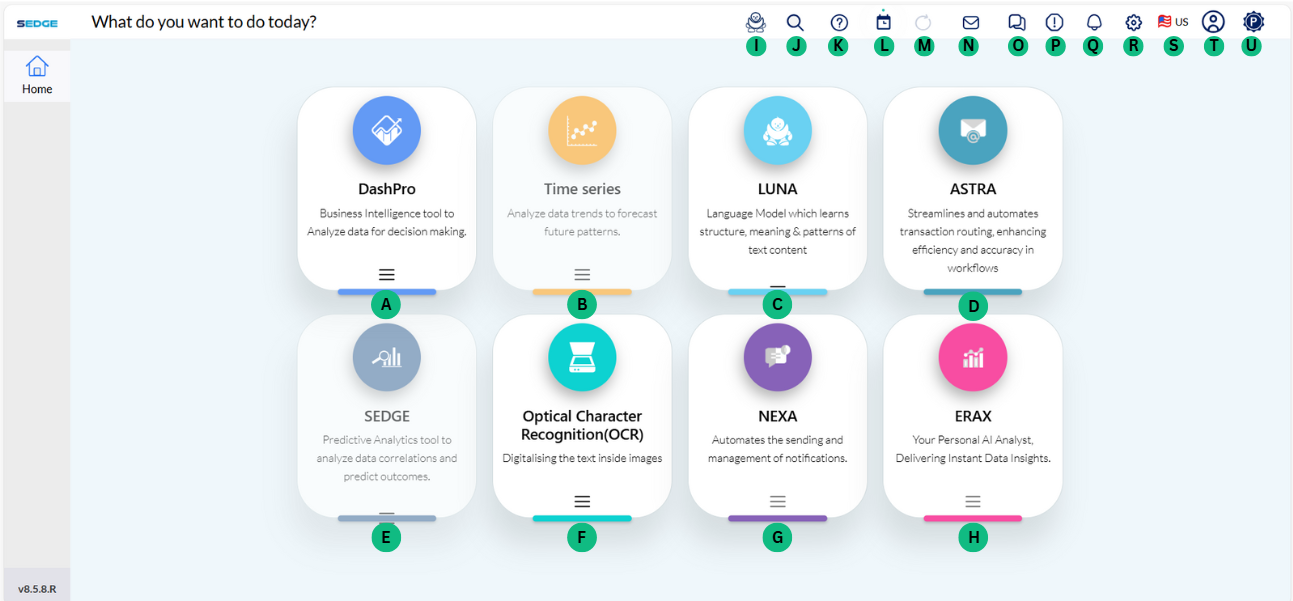
After signing in you are redirected to the home page of SEDGE where you can choose what kind of project you are going to work on.
A - DashPro - AI-powered analytics engine with 40+ chart types, real-time KPI tracking, smart filtering, and seamless data integration for fast, insight-driven decisions.
B - Time Series - Predicts future trends by analysing patterns like seasonality and irregularities using advanced models and data profiling techniques.
C - LUNA - Maritime-focused language model that automates query responses, interprets documents, and assists support teams to boost efficiency and speed.
D - Astra - Streamlines and automates transactional routing, enhancing workflow efficiency and accuracy while ensuring 24/7 precision in handling transactional operations.
E - SEDGE - Unified AI & ML platform delivering descriptive, predictive, and prescriptive insights to empower shipping businesses to make smarter, data-driven decisions.
F - OCR – Extracts text from scanned documents, PDFs, and images into editable formats like CSV, digitizing unstructured records to streamline data processing and support advanced analytics.
G - NEXA - Automates the sending, tracking, and management of notifications, ensuring timely communication across systems, teams, and users without manual effort.
H - ERAX - On-demand AI analyst delivering real-time insights and identifying patterns through instant data exploration and conversational interactions—no coding needed.
Control panel
I - Chat BOT - Maritime AI for faster queries, document handling, and team support.
J - Search tool – search through your documents, reports, projects, files or customers.

K - Help - To assist the user in an easier way to understand SEDGE.
L - scheduler console - Admin users can automate the export of dashboards as PDFs at defined intervals, with delivery to specified recipients via email. The feature also allows selection of specific dashboard tabs for a more tailored export.
M - Data refresh - Data refreshing updates your file with the latest information from the original source so it stays up to date.
N - Need consulting - User can contact SEDGE team through “Need consulting ?” option.
O - Forum - User can also share their finding , post scientific challenges of SEDGE and many more through “Forum”.
P - Report a bug - User can report a bug or raise a request through the application.
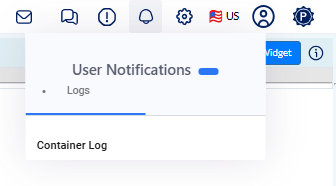
Q - User notification - shows the User Notifications dropdown in a web app. Clicking the bell icon reveals a “Logs” section with a “Container Log” option, which redirects to a detailed log page for real-time error and system monitoring.
R - User Quick Actions - Manage your pending actions, check your e-commerce accounting, have control over your projects and their status, look into your administration console or scroll through your customers and the latest business cases.

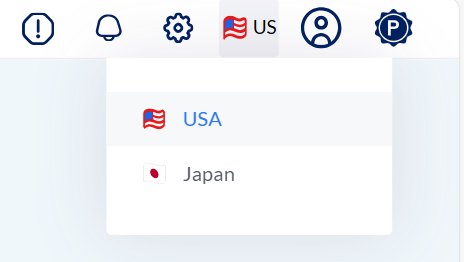
S - Language settings
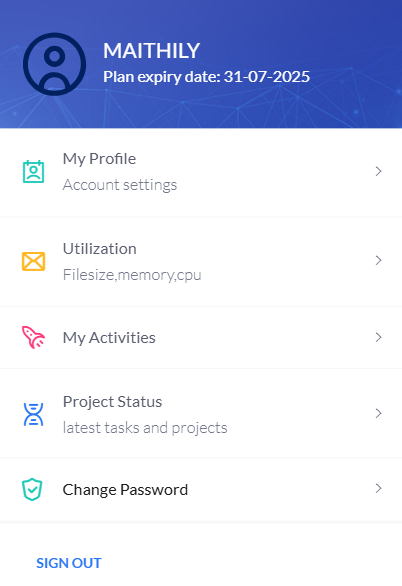
T - User settings - Manage your profile info and settings, check your inbox, activity notifications or your current tasks.
U - Premium Pack – 12-month subscription that includes full access to database connections.
Note
SEDGE offers three subscription packages to suit different needs: Basic, Standard, and Premium.

Basic Pack – Includes a 14-day free trial, but does not support database connection access.